Your portfolio.
Inside every
AI you use.

Upload your holdings as a CSV. Get a clean, fast tracker with no ads. Then connect Portico to Claude, Cursor, or any AI agent — so your assistant can finally work with your real numbers.
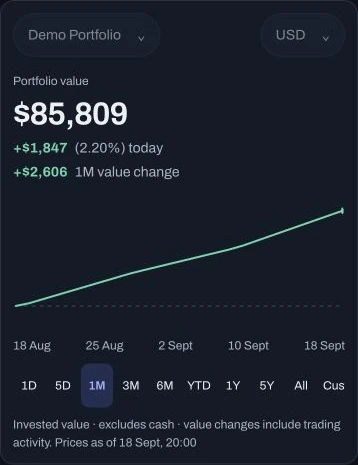
Portico sample portfolio: value, daily change and a single history chart with familiar time ranges.
Sample portfolio
claude-codeConnected
$ portico.get_portfolio()
NVDA 42 shares · +82.3%
MSFT 68 shares · +33.8%
AAPL 124 shares · +25.4%
+ 2 more positions
Works with
Claude
Cursor
Codex
Perplexity
Antigravity
+ any MCP client

All signal.
Zero noise.

Yahoo Finance buries your portfolio under ads, tickers, and promoted content. Portico shows you exactly what you came to see — nothing else.

  • Latest available prices, unrealized P&L, and cost basis
  • Dividend tracking across all positions
  • Daily changes and portfolio history across familiar time ranges
  • Multiple portfolios, cleanly separated
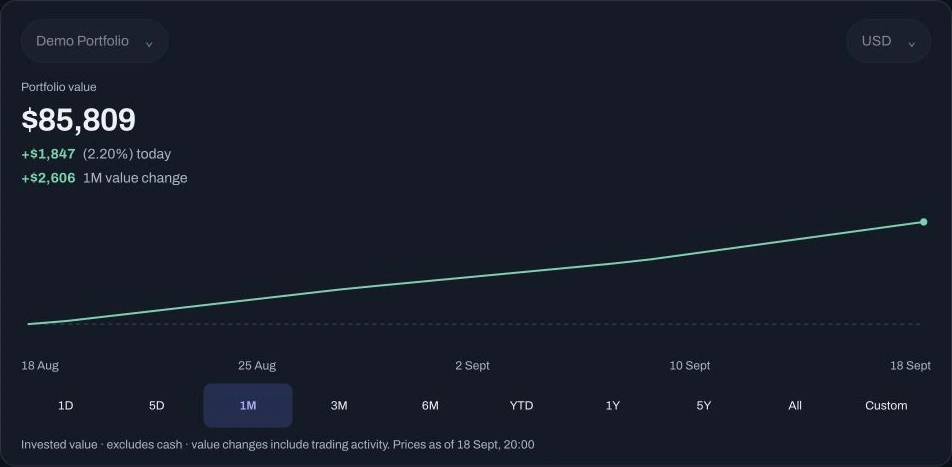
Portico desktop portfolio summary showing value, daily change and historical dates.
Portfolio view · Sample data

Your AI agents,
finally informed.

Add Portico as an MCP server in Claude, Cursor, Codex, or any compatible client. Your existing AI tools get live access to your positions, P&L, and transaction history — without leaving the apps you already use.

  • Paste one URL — sign in with OAuth, no tokens to manage
  • Query positions, returns, cost basis, and dividends from any agent
  • Get advice in context — no copy-pasting spreadsheets
  • Works with any MCP-compatible client
MCP server URL
// Paste into any MCP client — sign in with OAuth

https://myportico.app/mcp

// Or via Claude Code:
claude mcp add --transport http "Portico" \
  https://myportico.app/mcp
works in →ClaudeCursorVS CodeCodex

Up and running
in 30 seconds.

Export your portfolio from your broker. Drop the CSV. Portico parses Wealthsimple and Yahoo today, with more brokers rolling out — no API keys or brokerage integrations.

  • Wealthsimple and Yahoo Finance supported today
  • Transactions auto-calculate your cost basis (FIFO)
  • Re-import anytime to refresh data
  • More brokers — IBKR, Schwab, Robinhood — rolling out
⬆
Drop your CSV here
or click to browse · Wealthsimple or Yahoo format
1
Export from your brokerWealthsimple or Yahoo CSV — auto-detected
2
Drop it in PorticoPositions, cost lots, and transactions mapped instantly
3
Start trackingTrack holdings and P&L as prices update

Questions

How does the MCP integration work? +
You add Portico's MCP server URL to your AI client (Claude Desktop, Cursor, Codex, etc.) and sign in with OAuth — no API key to copy or manage. Once you approve the connection, your AI can call Portico's tools directly — querying positions, returns, cost basis, and transaction history — without you doing anything manually.
Which AI tools does it work with? +
Portico implements the Model Context Protocol (MCP), which means it works with any MCP-compatible client: Claude Desktop, Claude Code, Cursor, Codex, Perplexity, Antigravity, and more.
How do I import my portfolio? +
Export a CSV from your broker — Wealthsimple or Yahoo Finance today. We parse those formats automatically. More brokers — IBKR, Schwab, Robinhood — are rolling out.
What can my AI agent access? +
Your agent can query current positions and values, unrealized P&L, realized gains, cost basis per lot, dividend history, and performance over time. Nothing is shared until you approve the connection.
Is my data secure? +
Your data lives in your account. AI agents get access only after you approve an OAuth authorization, and that access expires automatically. We don't store broker credentials; you simply upload a CSV export.
Can I track multiple portfolios? +
Yes — a main account, a retirement account, crypto — all separately tracked and independently accessible to your AI agents.
Is it free? +
Portico is currently invite-only. Request an invite to get access. We plan to offer a generous free tier at launch.
What does the portfolio chart show? +
Portfolio charts show invested value excluding cash; historical value changes include trading activity. Intraday portfolio history is not yet available.

Track smarter.

Portico is currently invite-only. Request an invite to get access.

Invite-only access · No spam · Confirm by email

Terms · Privacy